
The Top Mistakes That Get Your Google Business Profile Suspended (And How to Fix them)
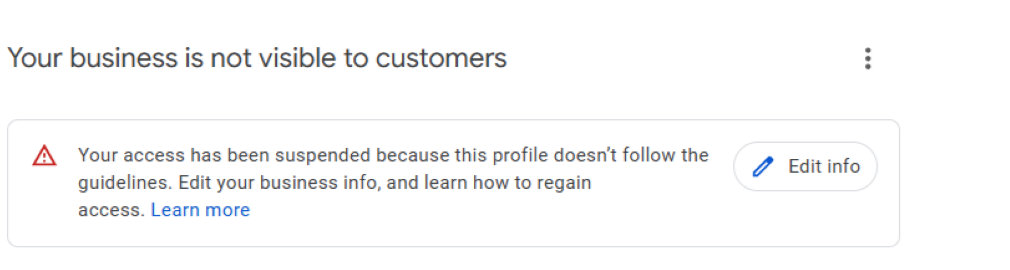
If you’re reading this, there is a good chance your Google Business Profile (GBP) was suspended. A profile suspension can tank your visibility and make it impossible for customers to find you. So, let’s dive into the most common mistakes people make that lead to a Google Business Profile suspension and how you can steer clear of them. Trust me, you don’t want to learn this the hard way!
TL;DR:
- Wrong or Fake Info
- Keyword Stuffing
- Service Area Business Guidelines
- Multiple Profiles
- Fake Reviews
- Inappropriate Content
- Keeping Info Updated
- Industry Specific Rules
- Changing Business Name After Approval
- Making Too Many Edits to Profile
- Other Managers or Account Admins
1. Filling Out Your Profile with Wrong or Fake Info
One of the biggest reasons I see businesses get suspended is that they include incorrect or misleading information in their profile. Google wants your profile to be 100% accurate so customers can trust what they see. The most common mistakes include:
- Using a fake business name: Adding keywords like “Best Plumber in Chino” to your business name instead of your actual name (e.g., “Joe’s Plumbing”) is a violation of Google’s TOS. Google considers this spammy and will likely suspend your account.
- Wrong address: If you list an address that doesn’t match your actual business location. The most common approach is to use a P.O. Box or a random location to appear closer to your customers. Google is very smart and will catch you, maybe not right away, but why risk it?
- Fake phone numbers or websites: Using a burner number or a website that doesn’t actually represent your business is another way to get in trouble. (by the way, I make kick-ass websites that dominate local SEO)
How to avoid it: Always use your real business name, a physical office address (not a home address), and legitimate contact information. Double-check that everything matches what’s on your website and other online listings. If you’re a service-based business without a storefront, use your home address but hide it from public view and set your service area correctly.
2. Keyword Stuffing in Your Profile
You might think cramming your business description or posts with keywords like “cheap electrician near me” or “best pizza delivery” will boost your ranking. Spoiler alert: it won’t. Google’s smart enough to know when you’re trying to game the system, and keyword stuffing can trigger a suspension fast. This includes overloading your business name, description, or categories with repetitive or irrelevant terms.
How to avoid it: Write a clear, honest description of your business using natural language. Pick the most accurate business category that fits what you do, and don’t try to sneak in extra categories or keywords. For example, if you’re a bakery, don’t add “catering” or “coffee shop” unless you actually offer those services.
3. Not Following Google’s Guidelines for Virtual or Home-Based Businesses
If you run a home-based business or a service-area business (like a plumber or electrician who travels to clients), you might think you can just list any address to look more legit. Wrong move! Google has specific rules for businesses without a physical storefront. For example, you can’t list a random office space you don’t own or use a virtual office just to appear in a certain area. Also, if you’re using your home address but don’t want it public, you need to mark it as a service-area business and hide the address.
How to avoid it: Be upfront about your business setup. If you don’t have a storefront, set up your profile as a service-area business and list the areas you serve. Make sure your address (even if hidden) is where you actually operate from, and don’t fake a location to rank in a bigger city.
4. Multiple Profiles for the Same Business
Creating more than one Google Business Profile for the same business at the same location is a huge mistake. Some business owners think they can create separate profiles for different services (like one for “Bob’s Plumbing” and another for “Bob’s HVAC”) to rank higher. Google sees this as trying to cheat the system and will suspend all your profiles. The same goes for creating duplicate profiles by accident, like if you forget you already have one.
How to avoid it: Stick to one profile per business location. If you offer multiple services, list them all under one profile using the correct categories and description. If you’re not sure if you have duplicates, search for your business on Google Maps or contact Google Support to merge or delete extras.
*You can have multiple profiles for different locations in some circumstances. Please feel free to contact me for further clarification, and I’d be happy to discuss it.
5. Posting Fake Reviews
Reviews are a big deal on Google Business Profile—they build trust and help you rank higher. However, getting fake or modifying legitimate reviews can result in suspension. This includes:
- Posting fake reviews: Asking friends or paying people to leave 5-star reviews is a major violation.
- Deleting or reporting legit negative reviews: You can’t just get rid of bad feedback unless it clearly breaks Google’s rules (like spam or hate speech).
- Leaving reviews for yourself: Using fake accounts to boost your rating is a quick way to get caught.
How to avoid it: Encourage real customers to leave honest reviews through emails, receipts, or polite in-person requests. If you get a negative review, respond professionally and try to resolve the issue. If you suspect a review is fake, flag it through your GBP dashboard and let Google handle it.
*Google has vast amounts of data and some of the smartest PhDs in the world working for them. They will find and catch your fake reviews.
6. Using Inappropriate Content
Google’s pretty strict about what you can post on your profile. Uploading photos, videos, or posts with things like adult content, hate speech, or anything illegal will get your profile suspended faster than you can say “Google Maps.” Even something as simple as posting a photo that’s not related to your business (like a random stock image) can raise red flags.
How to avoid it: Only upload high-quality photos and videos that show your business, products, or services—like your storefront, team, or actual work you’ve done. Keep posts professional and relevant, and avoid anything that could be seen as offensive or off-topic.
7. Not Verifying or Updating Your Profile
When you create a Google Business Profile, you must verify it (usually by receiving a postcard, video, or phone call from Google). If you skip this step or let your verification lapse, your profile could get suspended. Additionally, if your business information changes—such as your hours, address, or phone number—and you don’t update your profile, Google may suspend it for being outdated or inaccurate.
How to avoid it: Complete the verification process as soon as you set up your profile. If you move, change your number, or update your hours (like for holidays), log in and update your profile right away. Regularly check your GBP dashboard to make sure everything’s current.
8. Violating Industry-Specific Rules
Some industries, like lawyers, doctors, or locksmiths, have extra rules to follow. For example, Google might require professionals to provide proof of licensing or certifications. If you’re in a regulated industry and don’t follow these specific guidelines, your profile could get suspended. Also, businesses like bail bonds or certain financial services often face stricter scrutiny.
How to avoid it: Check Google’s guidelines for your specific industry before setting up your profile. Make sure you have all necessary licenses or certifications ready to provide if Google asks. If you’re unsure, search for “Google Business Profile guidelines for [your industry]” or reach out to Google Support.
9. Changing Your Business Name After Approval
This goes back to #1 on my list, but I cannot stress enough. If you change your name on Google, the algorithm will catch it, and you will automatically get suspended and need to justify the name change.
How to avoid it: Don’t change your name! LOL. Actually, I have successfully changed a business name completely on GBP. It’s not easy, and you need to stay within guidelines.
10. Making Too Many Major Edits
Adding photos and replying to reviews is perfectly fine. However, if you are making major changes to your Google Business Profile, the spam algorithm will automatically suspend it for this. There are some shady businesses out there that obtain a GBP for a legitimate company and then engage in a bait-and-switch tactic, completely changing the industry. Google has become very strict about changes to names, addresses, phone numbers, and categories in the past few years.
How to avoid it: If your profile is new, I recommend not making any of these major edits for at least a month. After a month, I would only make one major edit at a time and then wait a few weeks before I made any other. I’m overly cautious, but I’ve seen lots of profiles get suspended for making too many edits.
11. Profile Managers Other than You
Who else has access to your GBP? If you have added someone or an agency and they violated Google’s TOS it can affect you. If you get suspended, I would revoke access to anyone who has added access just to be sure.
How to avoid it: Remove other people you gave access to who are no longer involved in your business.
Need assistance with reinstating your suspended Google Business Profile?
Shoot me an email to see if I’m available to help.

